VesonixOne · Zero-Cost RPA

ZeroBot: Zero-Cost RPA.
Automation without license fees.

ZeroBot is a lightweight, enterprise-ready RPA runtime built for organizations that want automation at scale without the burden of expensive per-bot licensing. With attended and unattended execution modes plus an orchestrator-lite scheduler, ZeroBot delivers end-to-end automation while keeping costs predictable.
₹0
Runtime
license cost
0
Execution
modes
Bots you
can deploy
ZeroBot — Zero-cost RPA Platform
Orchestrator-Lite

Every job.
One bot fleet.

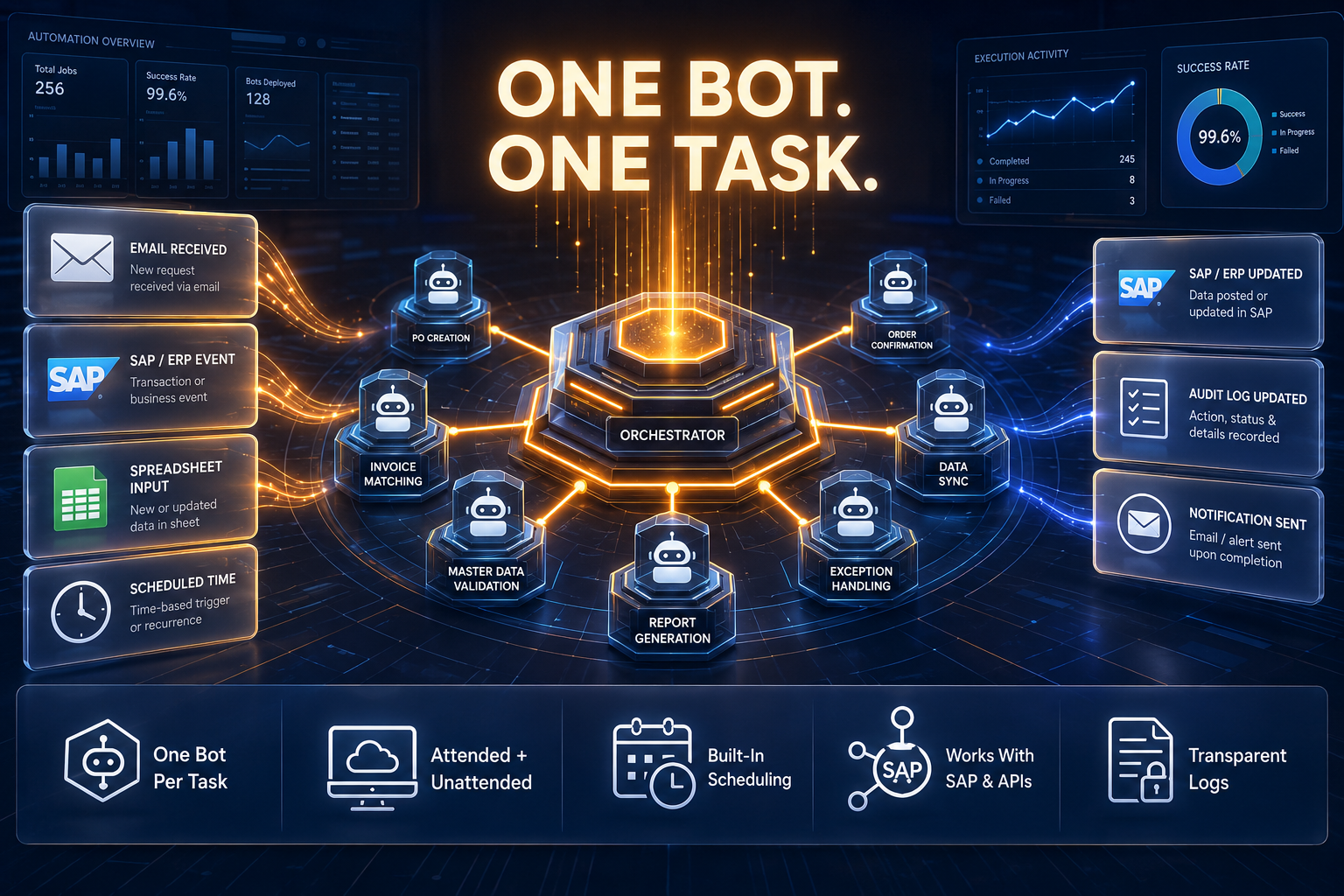
Requests arrive as email approvals, SAP-triggered jobs, file drops, or scheduled runs. Orchestrator-Lite queues each one, hands it to an attended or unattended bot, and logs the result — with built-in job scheduling, monitoring, and log management, and zero runtime license cost per bot.

Note: Email, SAP/ERP, Spreadsheet, and Schedule are simplified examples shown here to help you understand how ZeroBot works — not a fixed or complete list of what it supports.

One Bot Per Task
A fresh bot is created for each job it handles, then it's gone — nothing sits idle in the background.
Attended + Unattended
Run a bot with someone watching it on a desktop, or let it run on its own on a server — same bot, either way.
Built-In Scheduling
Set a job to run on a schedule, or trigger it from an event — no separate scheduler to configure.
Works With SAP & APIs
Connects to SAP and other systems through their APIs, so it fits into workflows that already exist.
Transparent Logs
Every step a bot takes is logged, so you can see exactly what ran and when.
Simple Platform Story

Your systems stay the same. ZeroBot does the repetitive work around them.

ZeroBot doesn't replace SAP, your APIs, or any other system it touches — it connects to them and takes over the repetitive steps a person would otherwise do by hand, running attended on a desktop or unattended on a server.

1
Your Systems Keep Running
SAP, APIs, and legacy applications stay exactly as they are — ZeroBot connects to them, it doesn't replace them.
2
Bots Handle the Repetitive Steps
Data entry, approvals, and file processing get automated, running attended on a desktop or unattended on a server.
3
IT Stays in Control
Command-line tools, transparent logs, and Orchestrator-Lite scheduling give IT full visibility into what's running and when.
How It Works

Start with one task. Add more without new licenses.

ZeroBot fits repetitive, well-defined tasks that are eating up someone's time today — not open-ended judgment calls.

1
Identify a repetitive task
Pick a process still done manually — data entry, file handling, approvals — that follows a consistent pattern.
2
Build the bot
Configure the steps once, attended or unattended, depending on whether a person needs to be involved.
3
Schedule and connect
Set it to run on a schedule or trigger it from an event, and connect it to SAP, APIs, or other systems it needs to touch.
4
Monitor and scale
Track every run through Orchestrator-Lite's logs and scheduling, then add more bots as new tasks come up — without new license costs.
Under the Hood

What runs, and how it fits your setup

2
Execution Modes

Attended and unattended — the same bot logic runs either way, on a desktop or headless on a server.

Built-In
Scheduling & Logs

Orchestrator-Lite handles job scheduling, monitoring, and logs, so there's no separate platform to set up for that.

Windows/Linux
Standard Infrastructure

Installs on the servers already in place — no special hardware or separate environment to provision first.

Why ZeroBot

Built for teams that run automation every day.

Support, Only If You Want It

Self-managed by default. Commercial support and SLAs are available if your team wants them, but they're not required to run the platform.

Runs With or Without Supervision

Run bots attended on a desktop when someone needs to trigger or watch a step, or unattended and headless on a server for jobs that run on their own — both modes use the same bot logic, so a process doesn't need to be rebuilt to change how it's triggered.

One Place to Schedule and Monitor Jobs

Schedule jobs, see what's running, and check logs from one place. It's not a full enterprise orchestration suite — it covers scheduling and monitoring without needing a separate product for it.

Easy to Monitor and Control

Every job writes a plain, readable log and can be triggered or checked from the command line — useful when IT wants to script around it or plug it into existing monitoring, not just work through a GUI.

Runs on What You Have

Installs on the Windows or Linux servers already in place — no GPU, no special appliance, no separate infrastructure to provision before automating anything.

Integrates With What You Run

Connects to REST APIs, SAP, and older systems that only expose a UI or a file drop — not limited to automating just the newest, API-friendly applications in a stack.

Common Questions

Questions people actually ask.

Click any question to read the answer.
ZeroBot
Yes — ZeroBot is a zero-license-fee RPA runtime; you can deploy unlimited attended and unattended bots without per-bot costs.
ZeroBot
Attended bots run on a user's desktop alongside their work, triggered on demand; unattended bots run independently on a server on a schedule. ZeroBot supports both from the same platform.
ZeroBot
No — ZeroBot doesn't replace SAP, APIs, or any other system it touches. It connects to them and takes over the repetitive steps a person would otherwise do by hand, running attended on a desktop or unattended on a server.
ZeroBot
Orchestrator-Lite queues each request — whether it's an email approval, an SAP-triggered job, a file drop, or a scheduled run — hands it to an attended or unattended bot, and logs the result, covering scheduling, monitoring, and log management from one place.
ZeroBot
ZeroBot fits repetitive, well-defined tasks that are already eating up someone's time — not open-ended judgment calls. Each job gets a fresh bot created just for it, which is gone once the job is done, so nothing sits idle in the background.
ZeroBot
Every step a bot takes is logged, and IT gets full visibility through command-line tools, transparent logs, and Orchestrator-Lite's scheduling — so what's running and when is never a mystery.
VesonixOne Platform

Explore the full platform